Learning to vibe code
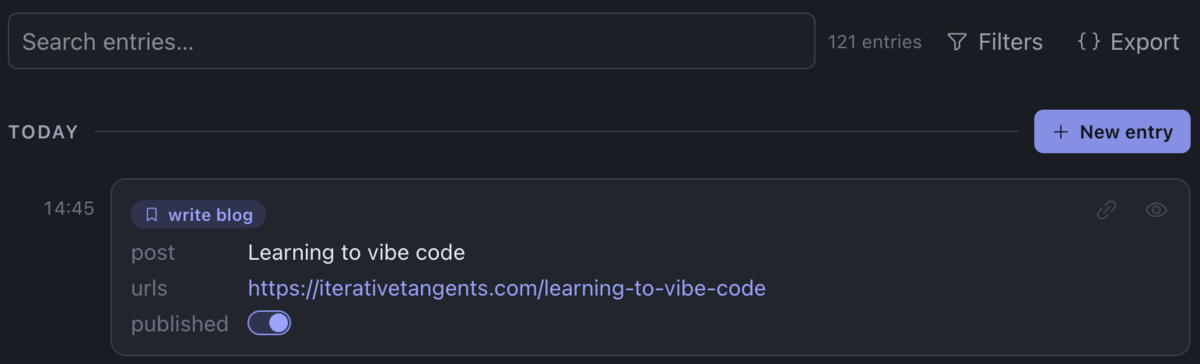
I've been learning to vibe code over the last few weeks, not because I've given up on programming and what I can learn from it, but because I have other projects that I bring more personal value to than the exact implementation of another database interface. To date I've been skeptical of vibe coding. Writing code has been part of my thinking process, and I doubted I would want to specify requirements as messy English prose instead of exact programming statements. But this project is heavily UI, at which I'm not fast at, so I decided to experiment with stepping back into a product owner role and using Claude Code as my development team. Unexpectedly, I've enjoyed it, and the LLMs haven't gotten as tripped up on their code as I expected. Maybe they've gotten more sophisticated. I certainly am not doing anything elaborate. The results so far have suited my needs, both in freeing my attention and in the quality of an app I now get to use. I only have one data point, but here are my best guesses on what contributed to having a better experience.
1. Identify jobs to be done
At my last job, I advised the lead on a new project to define several tasks that customers might use our new features to accomplish. Then we could go through workflows from the perspective of an actual user and make sure everything could be done smoothly. I only have a passing familiarity with the "jobs to be done" technique, having been introduced to it years ago as a software consultant at a company where a lot of emphasis was put on design thinking, but on greenfield products and features, I do find it helpful to know exactly what the user wants to accomplish. When starting my own product, I choose to take my own advice.
I took some long walks to think about the product I wanted and how past me would have used it. For example, I spent a year or so practicing free throws, for no other reason than to unwind at the end of the day, but being a dataphile, I counted shots made and baskets sunk and calculated my accuracy, to track whether I was getting any better. That was something for which I could have used the product I envisioned. I captured voice memos describing exactly what I would want to do for that job: get a reminder each day, create a new entry from it from a template of fields to fill out, then plot a graph of my success rate over time.
I came up with a couple dozen more ways I could have used such a product in the past, had it been available. That many definitions of jobs to be done probably isn't necessary, but the exploration had two significant side-benefits for me. First, they enabled me to see how many times I had already built this app in half-baked ways (a couple times as a DSL for producing EDN, as well as several jury-rigged ways in Obsidian), which proved I had an idea I would use, whether or not anyone else did. The second benefit is that it forced me to—
2. Define a vocabulary
As I compiled notes on the many and diverse tasks I could have used the product for, it was easy to mix up terminology. What was a "visualization", and how did it differ from a "plot"? To keep the documented use cases straight, I wrote out a glossary file that defined each term and what it meant. Then I used those terms consistently.
I've worked on teams that document glossaries before, but it's usually an afterthought, needed when the team becomes large enough that new developers need a reference for the jargon they hear. By then, though, it's usually too late. Different developers refer to different things by the same word, or the same thing by different words. I've never seen a glossary wiki page that went into so much detail it spelled out who called what by what term. Every new dev just had to learn that for themselves.
Defining a specific vocabulary up front, before writing any code, made it clearer to myself what I was describing, and I like to think that it also helped keep the LLM implementors on the right track. In fact, the only file I put in my repo at the start was my glossary file. I wrote the initial prompt using the same terms, and told the LLM to refer to the file for additional details.
3. Tease apart functionality
Defining a vocabulary identified different capabilities the app needed. Rather than overloading the term "notification" to mean, in one context, "remind the user" and in another context "warn the user", I chose the more specific terms "reminder" and "alert". That clarified the documentation, but more importantly it told me I had two separate features masquerading as one.
A clear mental model of the app's behavior makes a difference for user comprehension. Maybe it helps LLMs too.
4. Start with the backbone — and a bigger model
Years of working as a backend software developer helped me understand what parts of the app needed to be designed in from the beginning. For example, I wanted the app to be local-first, which would dictate the data model and database structure. An LLM might be able to overhaul the codebase to fix misaligned architectural decisions, but I already had low expectations about how far an LLM could get before becoming tangled in the complexity of its creation, and I wanted to give it a fighting chance.
I also specified in my initial prompt what order to build the core functionality. Had I built the app by hand, they would have been "milestones" or "phases", structured to let me test the most important capabilities first and validate my idea, then build additional features on top of them. As it was, the LLM built all the phases in one go. I haven't tested this hypothesis, but I like to think that structuring the implementation helped the LLM work from simple to complex with less churn and correction along the way. The result it spit out was pretty close to what I hoped to have, given the prompt I gave.
Before this project, I'd mainly used the medium-sized Sonnet model, but my initial prompt was complex enough that I tried Opus. I didn't want to burn credits going Opus all the way, though, so I backed down to Sonnet for simple tweaks and discovered that Sonnet was more than adequate for intermediate changes too. (Probably my requests are too moderate.) I doubt Sonnet could have created the original scaffolding as well as Opus, so I credit Opus with creating an internal setup that has enabled Sonnet to succeed.
5. Be hands-on
Since I have personal use for the app, I've had plenty of reason to try it, find what I don't like, and ask an LLM to make fixes or add features. Working incrementally like that, most of the changes are small, quickly handled by Sonnet.
I suspect this is the main differentiator between my experience vibe coding and my expectation that LLM agents would quickly stumble into complexity they couldn't manage. My original prompt was only about a thousand words, and subsequent requests, with no context other than the code base, have only been a few sentences. I'll only know certain details when I have software I can play with. I'm not trying to one-shot anything, then finding that a prompt I thought was thorough missed some edge cases and now I have to make the LLM backtrack.
The process has been a dialogue. I would have done the same with a human developer, refused to unload a grand vision then be uninvolved while they crafted perfection. For me to be perfectly satisfied, they would have had to not only read my mind but read thoughts that I didn't yet have. Being a participant in the process may have taken my time and attention, but it also helped the results.
6. Work solo
One luxury I have is that I'm working on this project by myself. There are no other developers writing documentation or prompts that use words differently than than outlined in the glossary, no conflicting paradigms clashing in the code base, no pull requests opened in parallel that make massive changes to the same parts of the code. I doubt vibe coding on a team would have worked this well.
Conclusion
I've only tried this once, so I can't say with certainty that the factors above made the difference between vibe coding the project into a wall and ending up with a product that fits my needs. I do plan to experiment with future projects. It's tempting to test whether a more expensive model is necessary at the outset. Some future projects will require vibe coding collaboratively. Over time, models may become big enough (or cheap enough) that I don't have to be so hands-on.
The product-level preparation, however, will be difficult to abandon. That's legwork that matters to the end user—figuring out the workflows, vocabulary, and the features that can compose together into powerful combinations. I doubt an LLM can do those for me. They may be able to help, especially with finding the right words for terms or detecting when I'm conflating two subtly different features, but as a product owner, I represent the users of the app, and if users can be replaced by an LLM, probably the app isn't needed.
The app is available here as a static site. It runs fully in the browser, with zero data sent anywhere. Entries are saved to the browser's local IndexedDB, so they persist after closing the tab. There's no documentation yet, so if you find the UI, terminology, or interactions unintuitive, email me. Also let me know if you have comments, find bugs, have suggestions for features, or questions about how you might use it for a particular purpose. I'd love to hear from you!